Envy Code B

October 2007 – November 2009 • 21,604 views • 4 responses

While Envy Code A was being polished for release it dawned on my how I would now prefer a thinner, taller font with slightly looser spacing and aiming for the ‘perfect’ size to allow good representation of all letters clearly including those with accents. The 10pt variant is that font however during testing it became apparent some people would prefer a version with tighter vertical spacing. This could not be achieved without sacrificing the uniformity of accented characters with their non-accented variants.

Download Envy Code B (Windows FON, all variants) (9 KB)

Download Envy Code B (TrueType, 10pt regular) (20 KB)

Check out the silky-smooth replacement Envy Code R

Samples

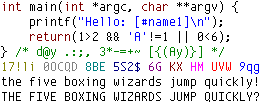
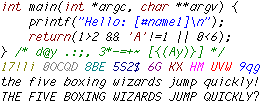
9pt regular
Sample of Envy Code B in 9pt regular
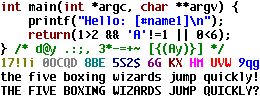
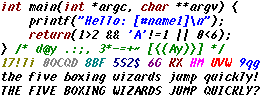
9pt bold
Sample of Envy Code B in 9pt bold
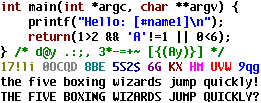
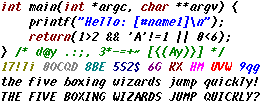
9pt italic
Sample of Envy Code B in 9pt italic
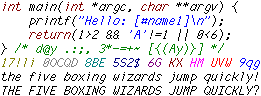
9pt bold italic
Sample of Envy Code B in 9pt bold italic
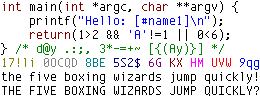
10pt regular
Sample of Envy Code B in 10pt regular
10pt bold
Sample of Envy Code B in 10pt bold
10pt italic
Sample of Envy Code B in 10pt italic
10pt bold italic
Sample of Envy Code B in 10pt bold italic

4 responses  

  1. Pingback Older pixel fonts back online on October 13th, 2007

    [...] Envy Code B – sizes from 9pt-10pt in regular, bold, italic and bold italic. (was the basis for Envy Code R) [...]

  2. Pingback Envy Code R coding font v0.7 preview » DamienG on November 27th, 2007

    [...] have noticed a pixel has been shaved off the vertical height which now brings it in line with the bitmapped Envy Code B coding font. I had intended on making the change for some time and the box characters practically demanded it [...]

  3. Pingback Font hinting and instructing – a primer » DamienG on May 7th, 2009

    [...] my bitmap font Envy Code B into the vector TrueType Envy Code R was a long process, the most difficult being [...]

  4. Keoma on March 30th, 2010

    Hi, I’m really in love with your Envy Code B font. Is there any chance you might be making some larger size versions of it? I’d love to use it all day, but it would have to be at least 11pt or 12pt. As it is, it’s too small for me to be comfortably using it for 8 hours of coding a day. Unfortunately, Code R is no alternative for me. I just can’t stand all that antialiasing stuff, making things all blurry and green or red, so I keep it turned off – and without antialiasing Code R is unusable too (for sizes other than 10pt, that is). But Code B is much nicer anyway, just look at the ‘y’ for example.

Leave your response

  1. (kept private)