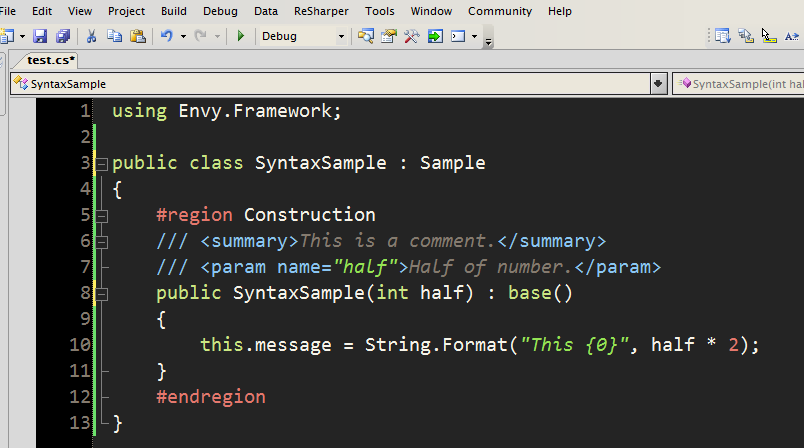
I came across a posting by Thomas Restrepo about a theme for Vim he likes called Wombat and how it wouldn’t be worth porting to Visual Studio as it doesn’t support italic syntax highlighting – as we all know.
This got me thinking and I was able to port it with italics although the process is a bit of a hack.
If I can figure out a way of making this hack re-distributable without infringing on copyrights I’ll follow this one up.
In the meantime here’s a screen-shot of it in action using Consolas.
I can’t stand using vim for .NET – I’ve got better things to do than commit the entire .NET Framework to memory. I remember watching a WPF screen-cast where the guy was using “his trusty editor” (vim or emacs – I forget ;-) and going on about the great keyboard short-cuts whilst constantly trying different method names, compiling yet again and finally looking up help in the absence of IntelliSense.
I did however check out the latest trunk of SharpDevelop this weekend and was quite impressed with both the product and the source code. There was a bit of flickering with the solution explorer and the icons seem to be a bit of a steal-and-mash but otherwise looks first class.
[)amien
7 responses
I decided against after consulting with a few people but you can probably achieve a similar effect using FontForge or other font editing programs (just make sure they preserve hinting)
Did you ever write that app? I've been mucking around with a hex editor and the TTF spec, but have only succeeded in screwing up my fonts royally so far :)
If there's no app, do you have any hints about which bits to flip?
Well the trick is to basically modify the italic version of the font to give it a new name and to present itself as bold.
I intend on putting together a simple app to do this to any installed font but in the mean time I did it by hand on my own Envy Code R font.
I still use Vim as a general purpose text viewer / editor, even though I use VS for actually writing code. It's just very useful for quickly examining / altering patch files, scripts, XML, config files, sometimes hacking VS project files manually because it's faster than using a wizard / property page etc. I'm not a fan of trying to use VS for absolutely everything, I tend to pick and choose the best tool for each job.
It involves modifying files so I'm trying to put together a binary patcher as I obviously can't redistribute the files themselves.
That looks pretty cool. Do you mind sharing what the trick was? :)
Well, you don't have to use Vim, you can use ViEmu in VS.NET.