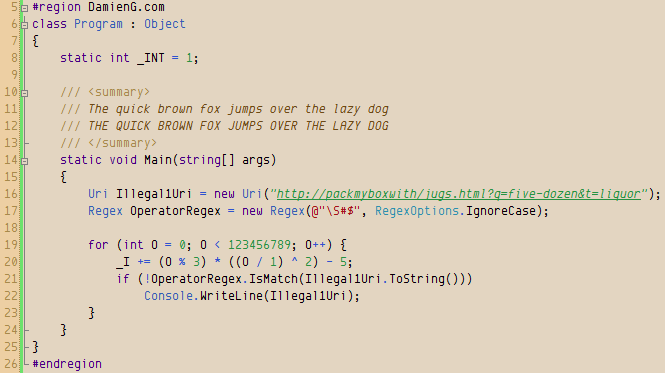
The default syntax color scheme in Visual Studio seems to be stuck in the 16-color era so once you’ve found your perfect font you are going to need a great theme to go with it.
Here is the theme I’m currently using at home (currently on a 42″ 1900×1200 LCD TV until I can find space for my monitor) that a couple of people have asked for.
To to take full advantage of this theme you will need to download:
- Envy Code R for the syntax font with the italics hack
- PalmOS for the output window’s tiny text
Alternatively you could remap it to your coding font of choice (but you won’t get italics because of limitations within the Visual Studio IDE).
Download
Download Humane for
Alternatives
If this scheme doesn’t appeal to you then why not try:
- Thomas Restrepo’s schemes (dark backgrounds)
- Scott Hanselman’s list of themes
- Jeff Atwood’s schemes (dark & grey backgrounds)
[)amien
0 responses