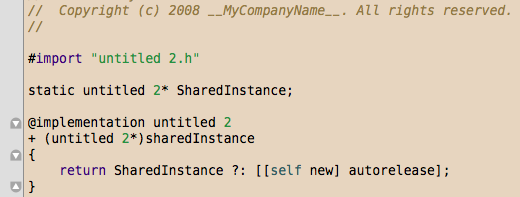
My Humane theme for Visual Studio is getting a fair bit of traffic today courtesy of Scott Hanselman. Given I have been messing with Mac development lately I thought it was worth porting to TextMate and Xcode 3.
Panic Sans coding font
My Envy Code R programming font isn’t great on the Mac yet so I have configured these to use the excellent but overlooked Panic Sans in 12 point which unlike Monaco is available in bold, italic and bold italic variants, as I like my comments in italics.
To install this font you must:
- Download Panic Software’s Coda application
- Navigate to the Coda application and choose Show Package Contents
- Navigate to the
Contents/Resourcesfolder - Double click on the
Panic Sans.dfontand press Install Font - Panic Sans is now available to other applications too
TextMate
Download
- Humane theme for TextMate (5 KB)
Launching the downloaded .tmTheme file will cause it to copy to ~/Library/Application Support/TextMate/Themes
Select Humane from the Preferences > Fonts & Colors pane in the drop-down list box
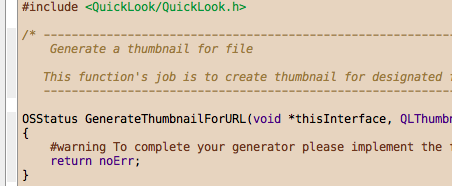
Xcode 3
Download
- Humane theme for Xcode (4 KB)
- Copy to
~/Library/Application Support/Xcode/Color Themes - Select Humane from the Preferences > Fonts & Colors pane in the drop-down list box
Porting themes
Until somebody comes up with an IDE-independent theme format or cool converter we’ll have to do it by hand. The easiest way I have found is:
- Install Hex Color Picker on the Mac to allow entering hex into the standard color picker
- Open the Visual Studio theme .vssettings file in a text editor
- Open up the Fonts & Colors preferences pane up in your Mac IDE
- Go through each one and choose the nearest match in the .vssettings
- Transcribe each color by reading the VS color pairs backward, e.g. 00631409 becomes #091463
[)amien
0 responses