In part 4 we followed data to and from the TI modem through the Intel 8251 USART landing in our buffers. Now comes the interesting part - rendering those Viewdata 40×24 frames on what is typically a 32×24 display.
Viewdata Control Codes
Every byte received passes through PROCESS_RX_CHAR at $160E. Characters $20-$7F are printable, but anything below $20 is a control code, and Viewdata treats them mostly like ASCII codes:
| Code | Name | Action |
|---|---|---|
$05 | ENQ | Clear echo mode |
$08 | BS | Cursor left |
$09 | HT | Cursor right |
$0A | LF | Cursor down |
$0B | VT | Cursor up |
$0C | FF | Clear screen, home cursor |
$0D | CR | Cursor to column 0 |
$0E-$0F | — | (Shift in/out, handled elsewhere) |
$11 | DC1 | Cursor on |
$14 | DC4 | Cursor off |
$1B | ESC | Set escape flag (next char is a control code) |
$1E | RS | Home cursor (row 0, col 0) |
The ESC mechanism is how Viewdata sends colour and attribute changes. When ESC is received, the flag at bit 0 of IX+$09 is set. The next printable character has bit 6 cleared, converting it from ASCII into a control code — so ESC followed by A ($41) becomes $01 (red text). The set-based attribute system works like teletext: colour changes apply from the current position to the end of the row and importantly the change itself takes up a space on the screen.
This ensures that each viewdata frame is exactly the same size regardless of colour changes etc. and also crucially for us avoids colour clash on our 32x24 attribute display.
The cursor position is stored as row in L, column in H. After processing any control code, the bounds-checking code at .update_cursor clamps the position to the 40×24 grid and handles wrapping both across rows and columns:
.update_cursor:
    LD A,$27             ; Max column = 39
    BIT 7,H              ; Column negative?
    JR Z,.col_ok
    LD H,A               ; Wrap to rightmost column
    DEC L                ; Move up a row
.col_ok:
    CP H                 ; Column > 39?
    JR NC,.col_bounded
    LD H,$00             ; Wrap to column 0
    INC L                ; Move to next row
.col_bounded:
    LD A,$17             ; Max row = 23
    BIT 7,L              ; Row negative?
    JR Z,.row_ok
    LD L,A               ; Wrap to bottom
.row_ok:
    CP L                 ; Row > 23?
    JR NC,.row_bounded
    LD L,$00             ; Wrap to top
.row_bounded:
    LD (IX+$0C),L        ; Store cursor row
    LD (IX+$0D),H        ; Store cursor column
    RET
The Display Buffer
Printable characters don't go directly to the screen. They're stored in a 40×24 display buffer (960 bytes) within the IX state block, then rendered. The CALC_BUF_ADDR routine at $1A59 converts that row=L, column=H position to a buffer address:
CALC_BUF_ADDR:
    PUSH HL
    LD A,H               ; Column
    LD H,$00
    LD D,H
    LD E,L               ; DE = row
    ADD HL,HL            ; ×2
    ADD HL,HL            ; ×4
    ADD HL,DE            ; ×5
    ADD HL,HL            ; ×10
    ADD HL,HL            ; ×20
    ADD HL,HL            ; ×40
    LD E,A               ; Add column
    ADD HL,DE            ; HL = row × 40 + column
    ; ... offset from IX base ...
The Z80 has no multiplication instruction so that sequence of 6 ADD instructions is a fast, fixed ×40 on a 16-bit register which works fine if we know we won't wrap.
The Font: 5 Columns to 8 Rows
 The font is almost a pixel-accurate copy of the one from the Mullard SAA5050 but with a couple of odd subtle changes. Specifically the y and the g have been vertically compressed to not use the bottom row - odd given that 'j' is using it just fine - and one extra pixel top right of the m which makes it look more square than the rest of the font.
Aesthetics aside, this is where the VTX5000 ROM starts shaving some extra bytes. The Viewdata character set uses a 5×8 pixel grid, and the font is stored in the ROM as 5 column bytes per character with each byte representing one vertical column of 8 pixels. This is in contrast to the Spectrum ROM, where the 8×8 fonts it supports are stored one byte per horizontal row, which better matches the Spectrum's screen RAM.
Every character needs to be transposed from column format to row format before it can be written to screen, and the SETUP_FONT_RENDER routine at $19BB does this transposition in a tight loop:
; Load 5 column bytes from font table
    LD C,(HL)            ; Column 1
    INC HL
    LD B,(HL)            ; Column 2 → H
    INC HL
    LD E,(HL)            ; Column 3
    INC HL
    LD D,(HL)            ; Column 4
    INC HL
    LD L,(HL)            ; Column 5
    LD H,B               ; H = Column 2
    LD B,$08             ; 8 rows to generate

.transpose_loop:
    XOR A                ; Clear accumulator
    RR C                 ; Rotate column 1, bit → carry
    RLA                  ; Carry → A bit 0
    RR H                 ; Rotate column 2
    RLA                  ; → A bit 1
    RR E                 ; Rotate column 3
    RLA                  ; → A bit 2
    RR D                 ; Rotate column 4
    RLA                  ; → A bit 3
    RR L                 ; Rotate column 5
    RLA                  ; → A bit 4
    EXX
    LD (BC),A            ; Store transposed row byte
    INC BC
    EXX
    DJNZ .transpose_loop ; Repeat for all 8 rows
Each iteration extracts one bit from each of the 5 column registers (using RR to shift each column right, moving the bottom bit into carry) and assembles them into a row byte (using RLA to shift carry into the accumulator). After 8 iterations, the 5 column bytes have been transposed into 8 row bytes. EXX swaps the main and alternate BC, DE, and HL pairs; the listing omits the setup that seeds the write address, so it is easy to misread LD (BC),A / INC BC as sharing the same B as the DJNZ row counter — they do not, because the pointer and the count are kept on opposite sides of each EXX. The result is stored in a work area within the IX state block.
Storing the font in column format saves ROM space — 5 bytes per character instead of 8 — which adds up to 288 bytes saved across 96 characters. In an 8K ROM where every byte counts, that's a meaningful saving, even at the cost of runtime transposition.
Double-Height Characters
Viewdata supports double-height text for headlines and emphasis. When the double-height flag is set (bit 2 of the attribute state), the SETUP_FONT_RENDER routine stretches the transposed font by duplicating each row:
.check_double_height:
    BIT 2,L              ; Double-height flag?
    JR Z,.font_done
    ; Stretch: copy 8 rows to 16 by duplicating each
    DEC BC
    LD E,C
    LD D,B
    LD HL,$0008
    ADD HL,BC
    EX DE,HL
    LD BC,$0010          ; 16 bytes (8 rows × 2)
.stretch_loop:
    LDD                  ; Copy byte backward
    INC HL
    LDD                  ; Same byte again (doubled)
    JP PE,.stretch_loop
This uses LDD (load-and-decrement) going backward through the work area, duplicating each byte. Each LDD decrements BC; the Zilog manual defines the P/V flag after LDD as set when BC is still non-zero after that decrement. JP PE tests P/V, so the loop continues until BC reaches zero. The result is each pixel row appearing twice, doubling the character's height.
Mosaic Graphics
Viewdata's distinctive blocky graphics use mosaic characters — a 2×3 grid where each of the 6 cells can be on or off, encoded in bits 0-5 of the character byte. The SETUP_FONT_RENDER routine handles these and thus avoids having to store another 320 bytes of glyph data for 64 block-drawing characters.
.mosaic_char:
    LD C,A
    RRCA
    OR $1F               ; Set up bit mask
    AND C
    LD C,A
    LD DE,$3807          ; Pixel patterns for cells
    BIT 0,L              ; Check row flag
    JR Z,.mosaic_even
    LD DE,$1803          ; Alternate patterns
.mosaic_even:
    LD B,$03             ; 3 pairs of rows
.mosaic_row_loop:
    XOR A
    RR C                 ; Left cell bit → carry
    JR NC,.left_off
    OR D                 ; Left cell on: OR in left pattern
.left_off:
    RR C                 ; Right cell bit → carry
    JR NC,.right_off
    OR E                 ; Right cell on: OR in right pattern
.right_off:
    ; ... store row bytes in work area ...
    DJNZ .mosaic_row_loop
Each pair of rows in the 2×3 grid gets the same pixel pattern. The $38 and $07 values are the left and right halves of a character cell — three pixels each. The result is the chunky 2×3 block graphics that give Viewdata pages their distinctive look.
Screen Address Calculation
The Spectrum's screen memory layout is, as anyone who's ever watched a SCREEN$ load, awkward. The 6,144 bytes of bitmap data at $4000-$57FF aren't arranged in simple top-to-bottom order.
Instead, the screen is divided into three thirds (0-7, 8-15, 16-23 character rows), and within each third, pixel lines are interleaved. Row 0 line 0 is at $4000, row 0 line 1 is at $4100, row 0 line 2 is at $4200, and so on — but row 1 line 0 is at $4020. A nice loading effect, but for anyone coding on it a pain - normally solved with a 192- or 384-byte Y lookup table.
Alas the VTX ROM has no space for such a table and so the CALC_SCREEN_ADDR routine at $1907 calculates the correct address for any character position on the fly. The attribute area is simple — 768 bytes at $5800-$5AFF in straightforward row-major order, one byte per character cell.
CALC_SCREEN_ADDR:
    PUSH AF
    PUSH HL
    LD A,H                    ; Get row
    ADD A,A                   ; ×2
    ADD A,H                   ; ×3
    LD H,A
    AND $03                   ; Extract pixel line within character
    XOR $03                   ; Invert (Spectrum screen is upside-down within chars)
    LD B,A
    LD A,H
    LD H,$00
    ADD HL,HL                 ; ×2
    ADD HL,HL                 ; ×4
    ADD HL,HL                 ; ×8
    ADD HL,HL                 ; ×16
    ADD HL,HL                 ; ×32 (32 bytes per character row)
    LD DE,$5800               ; Attribute file base
    ADD HL,DE                 ; HL = attribute address
    RRA                       ; Calculate screen row
    OR A
    RRA
    ADD A,L
    LD L,A
    EX DE,HL                  ; DE = attribute address
    POP HL
    POP AF
    RET
So taking in H as the ROW from 0-23 we get back the screen address in DE and the attribute address in alternate HL.
The Glyph Renderer
Once the font has been transposed and the start screen row address calculated, RENDER_GLYPH at $194B writes the actual pixels. The font data needs to be positioned at the correct column within the screen byte (since the Spectrum's screen bytes span 8 pixels, and Viewdata characters are only 5 pixels wide at arbitrary positions).
The renderer uses a jump table (RENDER_TABLE) indexed by column position. Each entry is a sequence of RLCA instructions that shift the font byte to the correct bit position, followed by masking logic:
    LD C,A               ; Save shifted byte
    AND D                ; Mask with column pattern
    LD B,A
    LD A,D
    CPL                  ; Invert mask
    AND (HL)             ; Clear old pixels in screen byte
    OR B                 ; OR in new pixels
    LD (HL),A            ; Write to screen
When a character spans two screen bytes (which happens when it doesn't align to a byte boundary), the routine writes the overflow into the adjacent byte using a second mask. The cursor blink also uses this renderer — alternating between the character at the cursor position and a solid block ($7F, the full block character) every few frames.
Phew.
The Prestel Protocol Parser
The PRESTEL_PARSE routine at $1265 handles the framing protocol used by the Prestel service for downloading telesoftware and multi-page data. This is separate from the Viewdata display protocol — it's a higher-level protocol for reliable data transfer over the Viewdata connection.
Prestel frames are delimited by pipe characters: |A marks the start of a frame, |Z marks the end. Between these markers, the protocol supports:
| Sequence | Meaning |
|---|---|
|A | Frame start |
|Z | Frame end (followed by 3-digit checksum) |
|F | Frame complete (all data received) |
|L | Length/repeat count (followed by 3-digit number) |
|I | Ignore toggle (enable/disable data storage) |
|E | Escape (literal pipe character) |
|0-|5 | Shift state (character set switching) |
We also have a checksum which is a running XOR of all received bytes, verified against a 3-digit decimal-as-ASCII value XORed with $26:
.verify_checksum:
    PUSH BC
    CALL READ_3_DIGITS   ; Read 3-digit checksum from stream
    POP BC
    XOR $26              ; XOR with checksum key
    CP C                 ; Compare with accumulated checksum
    JR NZ,PARSE_ERROR    ; Mismatch: error
    SET 2,E              ; Data is valid
The READ_3_DIGITS routine at $1375 is a tidy multiply-and-accumulate: for each digit, it multiplies the running total by 10 (via shift-and-add: ×2, ×4, +original = ×5, then ×2 again = ×10) and adds the new digit.
The frame detector (PRESTEL_DETECT at $1AE3) runs on every received character in the main loop, tracking pipe/escape state to detect frame boundaries. When a complete frame ending with |Z is found, it sets return code 5 to signal the BASIC program.
The MICRONET 800 Splash Screen
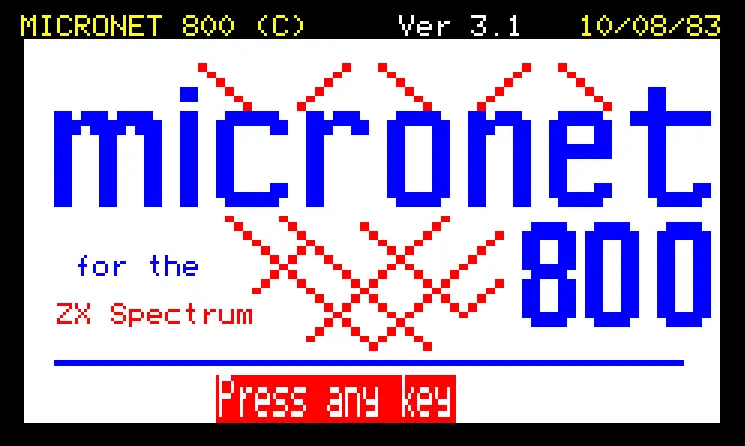
The last major data block in the ROM is the splash screen at $1D00-$1F82 — a raw Viewdata frame that displays the MICRONET 800 logo on startup. It uses mosaic graphics characters to build up the logo in multiple colours, with the text "MICRONET 800 (C)", "Ver 3.1", and "10/08/83" on the header line, "for the" and "ZX Spectrum" in the body, and "Press any key" at the bottom.
The frame uses standard Viewdata control codes: $03 for yellow text, $07 for white, $01 for red, $04 for blue, $11 for mosaic red, $14 for normal display, and $1D for new background colour.
It's a Viewdata page stored verbatim in the ROM — no compression, no procedural generation, just 643 bytes of raw frame data. Quite wasteful considering all the other savings that had to be made! We could have had a nice Y-address lookup table instead!
During start, this frame is copied to the display buffer and rendered using the same Viewdata engine that handles live Prestel pages.
Clearing the Screen: A Real-Time Constraint
One last detail worth mentioning: the CLEAR_SCREEN routine at $1A9A doesn't just zero the screen memory in one go. It clears one eighth at a time (768 bytes each), and calls CHECK_RX_DATA between each eighth:
.clear_third:
    LD BC,$0300          ; 768 bytes per eighth
    LD (HL),$00
    LDIR                 ; Clear bitmap
    CALL CHECK_RX_DATA   ; Poll modem — don't miss incoming data!
    LD A,$58
    CP H
    JR NZ,.clear_third   ; Next eighth
At 1200 baud, a character time is on the order of ~8.3 milliseconds (10 bits at 1200 baud). One LDIR clearing 768 bytes is roughly 768 × 21 T-states per iteration, or about 4.6 ms at 3.5 MHz — still less than a character time, but close enough that polling the modem between eighths is a sensible safeguard. That way, even during screen clears, no incoming data is lost. This kind of attention to real-time constraints throughout the code is what makes 1200 baud work reliably on a machine with no hardware flow control.
Wrapping Up
That's the complete VTX5000 ROM — 8,192 bytes covering ROM paging, a BASIC terminal application, modem I/O with ring buffers, keyboard scanning, a Viewdata rendering engine with font transposition and mosaic graphics, a Prestel protocol parser, and a splash screen. All of it running on a Z80 at 3.5MHz with no operating system, no hardware abstraction, and little room to spare - not helped by having to support 16KB machines.
The disassembly reveals a team (RT and DS at Scicon Ltd) that understood the constraints - tricks from repurposing RTS for ROM paging, to column-format fonts, to polling between screen clears all show they knew exactly what was needed to work within the limited situation they had.
This kind of optimization is something of a lost art today, partly because our systems have more than enough capacity and partly because it's hard to get right, but it's interesting to think again about how code used to be hand-optimized like this!
0 responses