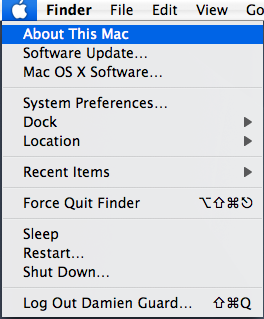
Apple tends to hide away unusual functionality in order to keep the user interface easy to use.
Here are a few hidden menu options that magically appear when you press the Shift, Alt or Ctrl modifier keys.
Standard menus
Apple menu
- Alt > System Profiler... (Leopard only)
- Alt > Shut Down (with no confirmation)
- Alt > Restart (with no confirmation)
- Alt > Log Off (with no confirmation)
- Shift > Force Quit ? (current application)
File menu
- Alt > Close All (in some applications)
Edit menu
- Alt > Deselect All (in some applications)
Window menu
- Alt > Minimize All
- Alt > Zoom All
- Alt > Arrange in Front
Finder
Finder menu
- Alt > Empty Trash (no confirmation)
- Alt > Secure Empty Trash (no confirmation)
File menu
- Alt > Always Open With
- Alt > Show Inspector (like Get Info but changes to reflect whatever you select)
- Shift > Slideshow (Leopard only)
- Shift > Add to Favorites
- Shift > Find by Name... (Leopard only)
- Ctrl > Open in this Window (Leopard only)
- Ctrl > Get Summary Info
View menu
- Alt > Clean Up
- Alt > Keep Arranged By (Leopard only)
Go menu
- Ctrl > Enclosing Folder in this Window (Leopard only)
Dock
Application running menu
- Alt > Hide Others
- Alt > Force Quit
Safari
Application menu
- Alt > Private Browsing (no confirmation)
File menu
- Alt > Close All Windows
- Alt > Close Other Tabs
Bookmarks menu
- Shift > Add Bookmark to Menu
Pages
Edit menu
- Alt > Delete Page (no confirmation)
Insert menu
- Alt > Custom Footmark...
QuickTime Player
Window menu
- Alt > Show Movie Info
iPhoto
Photos menu
- Ctrl > Hide Flagged Photos
- Ctrl > Move Flagged to Trash
- Alt > Clear All Flags
Events menu
- Alt > Merge With Next
iChat
Buddies menu
- Alt > Send Direct Message
Window menu
- Ctrl > Logout Jabber List
Xcode
File menu
- Ctrl > New Empty File
- Ctrl > Close Project
- Alt > Open in Separate Editor
- Alt > Reveal in Finder
- Alt > Show Inspector
- Alt > Save All...
- Alt > Save a Copy As...
View menu
- Alt > Zoom Editor In Fully
- Alt > Split View Horizontally
Project menu
- Shift > Ungroup
Run menu
- Alt > Step Into Instruction
- Alt > Step Over Instruction
Find menu
- Shift > Find Previous
- Shift > Replace and Find Previous
- Alt > Find Select Regex in Project (Damn useful!)
- Alt > Replace All
OmniWeb
File menu
- Alt > Save As...
Bookmarks menu
- Alt > Open Bookmarks Window
- Ctrl > Open All Changed Bookmarks
OmniGraffle Pro
Edit menu
- Alt > Select None
Arrange menu
- Alt > Bring Forward
- Alt > Send Backward
Note: OmniGraffle Pro also toggles various toolbar buttons on Alt including lock/unlock and which side the utilities drawer slides out.
OmniOutliner & OmniFocus
View menu
- Alt > Expand Line Completely
- Alt > Collapse Line Completely
VMware Fusion
Virtual Machine menu
- Alt > Start Up Guest
- Alt > Shut Down Guest
- Alt > Suspend Guest
- Alt > Restart Guest
Colloquy
View menu
- Alt > Show Inspector
- Alt > Mark All
Window menu
- Alt > Select Previous Active Panel
- Alt > Select Next Active Panel
Camino
View menu
- Alt > Reload All Tabs
- Shift > Force Reload Page
Bookmark menu
- Shift > Bookmark Current Page
- Shift > Bookmark Current Tabs as Tab Group
If you like keyboard short cuts you might also want to check out KeyCue which can display all of an application’s short cuts in a single list when you hold down the Apple key including these key-modified options.
Heavy keyboard users may also want to head to the Keyboard & Mouse preferences pane where you can switch on full keyboard navigation allowing you to tab through all controls in a window. It also shows a number of useful key-navigation options you may not be aware of such as pressing CtrlF3 to select an item from the dock.
[)amien
0 responses